
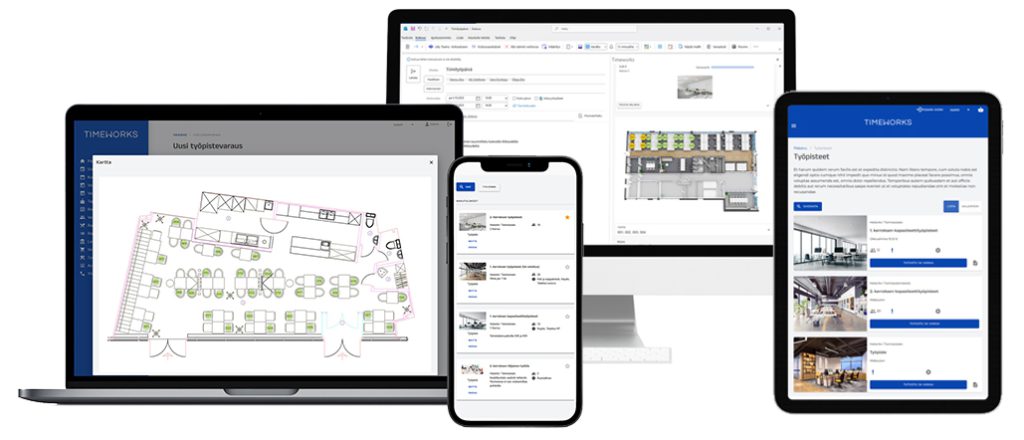
Flexible workstation bookings
- Book a workstation through a browser, on mobile or in Outlook
- Select a workstation from a floor plan or book a place based on an area’s capacity
- Browse workstations in calendar, map and search views and check real-time availability
- Find a suitable workstation by location, equipment or intended use
- Plan office days with recurring bookings
- Book a workstation for a colleague too and sit close to your team
- Define area-specific permissions and booking restrictions for different user groups
- Track workstation use and utilization with reports
Plan your whole working day
Book a workstation for your own work and, if needed, a meeting room for a team meeting or customer appointment during the day. Choose a meeting room according to the number of participants and the equipment required, such as video conferencing facilities. Catering and visitor notifications can be added to the meeting booking when needed. You can also include a parking booking in your working day.
Explore meeting room bookingBook through a conversation with the AI assistant
Describe your working day’s needs in your own words and discuss them with the Timeworks AI assistant. For example, you may need a workstation for the full day and a meeting room suitable for video conferencing in the afternoon. The AI assistant is available as an optional service.
Explore the AI assistantEasy administration
Manage booking capacity, floor plans and workstation environment settings without technical expertise. Extend use to new locations and update settings as needs change.
A solution that reflects your organization
Timeworks adapts to your organization’s visual identity, structures and practices. Include cost centers, user groups and other organization-specific information, and define suitable views and booking permissions for each group.
Explore organizations and permissionsIntegrations
Connect workstation bookings to Outlook, single sign-on (SSO), access control and other workplace systems. Integrations make services easier to use and reduce duplicate work.